


Minimum Valuable Increment
Deliver the smallest-sized item of work that will provide value
Overview
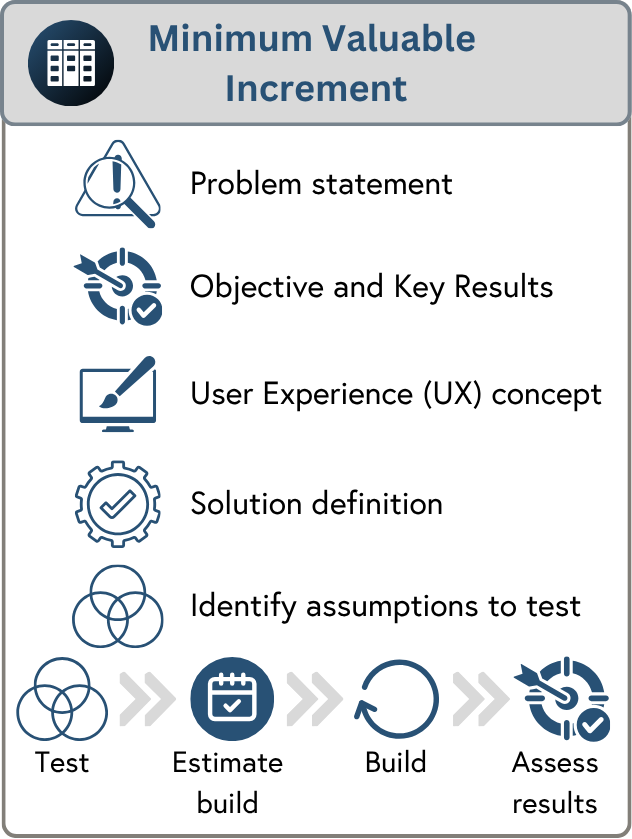
As the name suggests, the Minimum Valuable Increment helps you break down your Strategic Area into parts that deliver value independently. Minimum does not necessarily mean small. Each MVI should contribute to the Strategic Area’s desired results (from its OKRs). At the point you have achieved sufficient value or discovered the strategy won’t work, you may decide to stop work altogether.
Delivering your strategy using MVIs provides the following benefits:
Each MVI can be tested for value independently. For example, one data quality check is a big problem for customers, while another is a minor annoyance.
Large assumptions are identified for up-front testing, so you can stop or pivot quickly if one proves wrong.
Each increment is tested for commercial viability, whether the total cost to build, operate and support it justifies the value it returns, not just whether it is desirable and feasible.
Where a strategy's desired key results will only move after many MVIs are done, each MVI can give you leading indicators of progress as you go.
MVI results tracking in detail
There are several benefits to tracking individual MVI results that feed into the Key Results (OKR) of the Strategic Area.

MVIs as early strategy success indicators
In some cases, your strategy may contain measurements that are slow to change or difficult to measure regularly. The MVI can provide early signals that help predict the strategy results. Let’s use an example to demonstrate this. In your Strategic Area, you are addressing a low Net Promoter Score (NPS) caused by a poorly designed user interface. You create a set of MVIs that improve screens and simple workflows. Running the NPS survey every time you make an incremental improvement may not yield much change to the NPS score and, worse, could annoy your customers. In each MVI, you measure the customers’ satisfaction with that specific change, e.g. you have redesigned a screen, and you want to know what customers think of it. Early positive feedback suggests the NPS score is likely to improve.
Understanding the value of each MVI
You could simply measure the strategy, but knowing what each MVI has achieved has major benefits. We will use the NPS score example above to explain why:
Learn faster - You can see which MVIs are most impactful. For example, you find that customers responded much more positively to your work improving workflows than changes to individual screen designs.
Use learnings to reprioritise - You could re-order your MVIs based on your new understanding of customer value.
Stop releasing low-value work - With reprioritisation, you may decide that some MVIs are no longer worth doing.
Re-evaluate your strategic approach
From the results coming back from MVIs, you may discover your whole strategic approach isn’t working. You may need to look for a completely different solution (pivot) or stop the strategy altogether.
MVI canvas
The MVI Canvas helps you structure your discovery phase. The tabs below the canvas contain detailed guidance on each section.
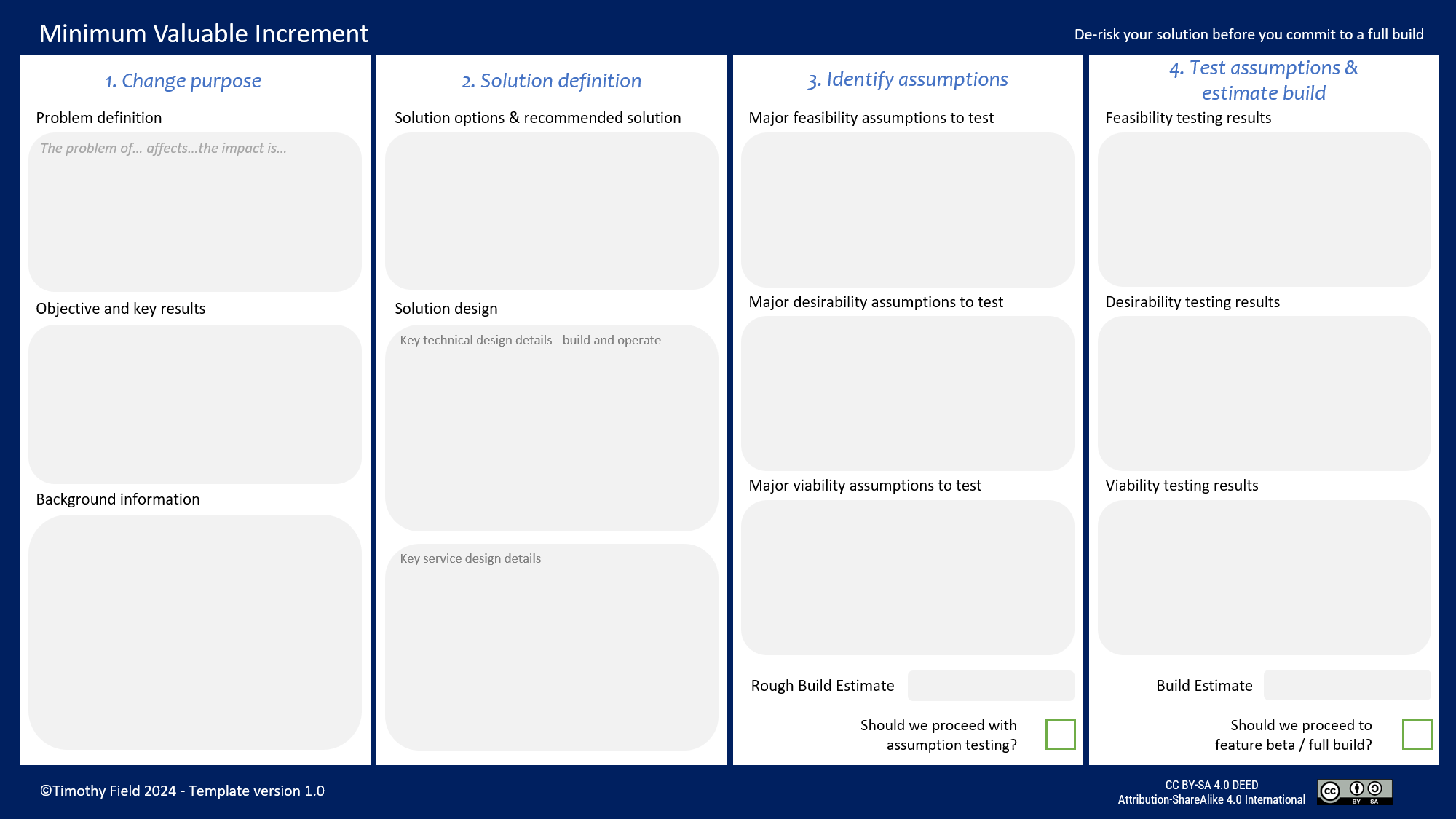
Feel free to recreate the canvas in a tool of your choice. Please attribute the author (Timothy Field), the source of the canvas (this webpage) and add the CreativeCommons BY-SA license
When not to use the MVI canvas
The canvas carries an overhead and is not always useful:
No need for the canvas - Consider skipping the canvas where you're doing very well-understood work with minimal risk.
Canvas only run for first MVI - For example, you are increasing code quality, the approach is well understood, and the outcome is clear. In this case, you may run the canvas for the first MVI. Again, using the code quality example, you are testing a new approach. Once understood, this simply gets repeated over and over.
Important anti-pattern - A subtle anti-pattern here would be skipping the canvas when the next MVI’s solution is broadly the same but addresses a different customer problem. You create a data quality checker with five initial checks using the canvas. You could then assume that each additional data quality checker is now known work. However, this would miss the fact that each data quality check could be valued differently by customers. Each is solving a distinctly different problem. You have made a desirability assumption, and you risk spending significant time on low-value work.
Stages not covered in the MVI canvas
The MVI canvas focuses on up-front discovery. The build and results-tracking activities are run outside of it. The tabs 5. and 6. below provide information on these.
Process in detail
1. Change purpose
The reason for this change and how you will measure its impact.
Problem definition
By quantifying the problem, you can better understand its impact. Customer-focused change can be particularly difficult to assess. Design feedback can be overwhelmingly positive, but still results in a lack of interest in buying or using your feature. For example, they like the idea of your new diary organiser, but more importantly, how much time per day are they losing without it?
Using the problem statement format:
The problem of [description]
Affects [persona]
The impact is [ideally quantified]
Affects [persona] is useful when you have multiple types of customers and are targeting a specific subset. For example, you have a few enterprise customers who need a new audit function. Otherwise, this should default to everyone that matches your Ideal Customer Profile (definition is in the link).
The problem will be linked to the Strategic Area’s problem statement, but at a more granular level. For example, you have created a personal organiser strategy, and this MVI is for a diary organiser:
The problem of spending a lot of time organising meetings
Affects our customers
The impact is that they are losing 1 hour per day to this activity
Objectives and Key Results
Using the OKR format
Objective - a single sentence
Key Result - From [X] to [Y] by [Z] date committed/stretch
Objectives
The objective should be an easy-to-understand sentence that summarises your strategy. For example,
Reduce the average time a customer spends organising their diaries
KR1 - From an average of 1 hour per day to 10 minutes by June 2027 stretch
June 2027 in this example is when the outcome should be achieved. You may be able to validate this early with a few customers or even internally.
Key Results - Committed versus stretch
Key Results can be “committed” where outcomes are guaranteed. For example, becoming security accredited by November. You can commit to this. “Stretched” means they cannot be. For example, 10 customers will have bought our product by November. You do not have control over this outcome. Additionally, stretched can help you aim high. If you are asked to “commit” to customer sales numbers, you are very likely to go low.
Major anti-pattern
Do not put the solution in the OKR and measure it. For example:
Objective - Rewrite technical documentation
KR1 - From 34 poorly written documents to 30 by November 2027 stretch
Now we have completely lost track of all benefits. The real objective could have been - “To reduce the number of support calls”. The technical documentation rewrite is a solution for this.
2. Solution definition
This section accounts for the possibility that there may be multiple ways to solve the problem.
Solution options & recommended solution
There may be multiple options. Make sure you explore these options before deciding which one to continue with. Solution recommendations should take into account operational and run aspects. For example, when working with software, you may have several options:
More costly strategic solutions that are cheaper in the long run to maintain and modify.
Cheaper tactical solutions that are faster to release.
Buying a third-party tool.
In some organisations, the senior team/team member may want to decide which solution is taken forward themselves. Further work on a solution that they don’t agree with could be wasted. In this case, involve them early and work with them directly.
Solution design
You may need to better understand your solution in order to assess its size and identify assumptions. This section covers many aspects of design. With an established product, you may already have a solution for most of these, but they are still worth checking.
The canvas should record key design details that can serve as an executive summary. You may need supporting documentation to go with it.
Keep design lightweight
For example, you may wish to record that you need to support 100 customers a day. If you have done this before or it’s a well-understood solution, you do not need to produce a full technical design with a data caching system.
Technical design
Technical design includes build and run, e.g. monitoring the health of a server. Non-Functional Requirements (NFRs) should be considered in your design:
Performance, e.g. response time, throughput, latency under load.
Scalability, e.g. how the system copes as users or data grow.
Availability, e.g. uptime targets, acceptable downtime.
Reliability, e.g. failure rates, recovery time, fault tolerance.
Security, e.g. authentication, authorisation, encryption, vulnerability management.
Maintainability, e.g. how easily the system can be modified or fixed.
Usability, e.g. accessibility standards, ease of use.
Compatibility, e.g. supported browsers, devices, integrations.
Observability, e.g. logging, monitoring, alerting.
Compliance, e.g. regulatory or data-residency requirements.
Data integrity, e.g. backup, retention, consistency.
Disaster recovery, e.g. RTO and RPO targets.
Service design
Some product changes can require significant customer support. This can include aspects such as product configuration. The canvas should include major service details, e.g. 24/7 support with a dedicated team, self-service setup with online training.
In more complex scenarios, there are two very useful tools for designing how a customer will interact with your organisation:
A Customer Journey Map is a visual representation of the customer’s touchpoints.
A Service Blueprint extends these to show how the organisation works behind the scenes.
These are some considerations:
System set-up, e.g. consulting services and training.
Live service support, e.g. support team readiness, support team hours and SLAs.
Communication, e.g. feedback mechanisms, launch announcements and system problem updates.
Security checks, e.g. verification and fraud detection.
Payment, e.g. taking payments and disputes.
Error handling, e.g. support for failed processes.
Legal, e.g. terms of service and liability.
Data privacy, e.g. regulatory compliance.
Team design to support the new service.
User Experience (UX) concept
If you are working with any sort of visual interface, the UX concept can help bring understanding and alignment. Visualisations can be much easier to understand than text-based descriptions. It can be used to validate business and technology solutions and form the basis of user testing. The concept does not need to be high resolution, especially if this means its creation will be slow and make it difficult to change.
3. Identify assumptions
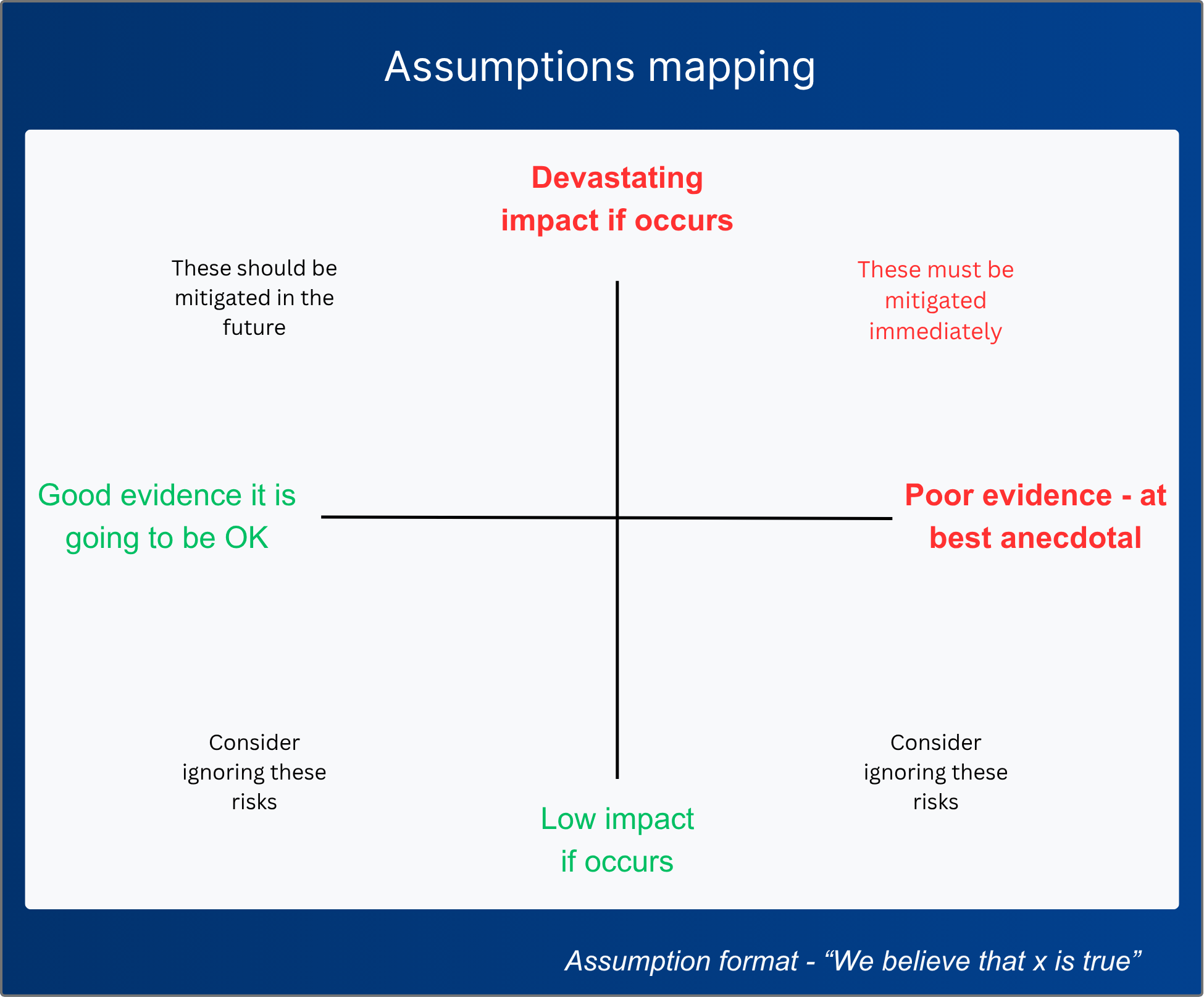
Assumptions are a way of expressing risk. The assumption mapping process (described in full in this section) is used to evaluate these and has an important advantage over traditional risk management. You explicitly consider evidence, not "likelihood". Let's use an example to demonstrate the difference. You ask a developer for risks, and they consider many factors, one being, "Can we connect securely to the tool vendor’s API?" In traditional risk management, the person is asked to consider likelihood and thinks, "We almost certainly can." That confidence can stop the risk being raised. Assumptions mapping asks, “What evidence do we have?” and “If we’re wrong, will this have a devastating impact?” If the developer has no evidence and this could destroy the project, they will raise the assumption for testing. Testing could be as simple as reviewing technical documentation.
Traditional risk management remains useful for handling future events that may or may not occur. For example, new EU AI rules are due next month, which may change your scope. This is not an assumption but an active risk you need to track. Avoid all brainstorming high-impact low-likelihood risks. It does not help a typical project to be looking for unlikely disaster scenarios!
Types of assumptions
There are three types of assumptions:
Desirability - Do customers want this? Whether they will use your new solution can be impacted by a few factors. Most importantly, is the problem big enough for them to need a solution? A quantified problem can help with this. For example, they are wasting 2 hours a day on a manual process. Desirability is also affected by alternative solutions. There may be competitors who already solve the problem, or worse, free high-quality, open-source solutions.
Feasibility - Can it be built and supported and, if necessary, scaled?
Build assumptions - For example, assuming a vendor’s API is fast enough to support what you want to do. In this case, that incorrect assumption would mean you can’t proceed. Some feasibility assumptions aren’t a yes/no answer. In software, you can largely build anything. You could, therefore, spend years rewriting the vendor's application, but this wouldn’t make sense. Assumptions are not just yes/no, they are also about expected development time/costs. With an assumption proven wrong, you still have the option to look for alternative solutions.
Support assumptions - These assumptions cover customer and software runtime support, e.g. monitoring your error logs. You should also consider the new manual work involved. For example, have you made an assumption about the support team’s capacity to contact each customer where a new AI solution can’t solve their problem?
Scaling assumptions - This can impact development, support and runtime. Will your design be performant at scale? On the support team side, you may be able to support it today, but with a couple more customers, you need a new support team.
Viability - Does this make sense financially? Consider if the costs to build, operate and support it justify your expected revenue from sales or cost savings. When calculating potential sales revenue, remember that a customer saying they “like” something is not the same as being willing to pay for it.
Identifying assumptions
Each person should create assumptions starting with “We believe”. For example, we believe we can call the vendors’ payments API every 5 seconds to get real-time data back. There are natural filters here: 1) you may be able to quickly check this and remove the assumption OR 2) simply pre-filter assumptions that are low impact, especially those that you already have good evidence about.
Decision to proceed
The canvas is presented in this first stage gate to senior leadership. They may decide to ask for more detail, proceed or stop. If there are no assumptions to test and the design is well understood, you may go straight to a build.
4. Test assumptions & estimate build
Create assumptions tests
With your assumptions identified, you can now create tests for them. Aim to make these as simple as possible. For example, if a connection to a tool vendor’s API is an assumption, can you knock up a quick throwaway prototype? Some assumptions can be too difficult to test quickly and can be taken into build. For example, a highly complex piece of technical work that will take as long to prototype as to build. If you have a lot of tests, you may decide to manage them with a basic project plan.
Testing results
Some assumptions may simply be removed. For example, you now know that your selected vendor is security-compliant. Others you have increased confidence in. For example, you have run desirability testing with a visual prototype and the feedback is overwhelmingly positive.
Build estimate
After removing significant assumptions, the team can now create a detailed backlog of work and estimate the build stage more accurately. One technique that is useful for this is user stories and tasks.
Decision to proceed
This is the second stage gate designed for senior leadership to decide whether to proceed or stop. Typical reasons for stopping would be poor results on the assumptions testing and high build estimates. You have the option to look at alternative solutions at this stage.
5. Build (not a canvas section)
Progress is tracked here. The product burnup is a useful artefact for understanding the speed at which the team is delivering and the level at which scope is increasing. Delivery risks and issues should also be carefully managed.
We may also run additional testing such as:
Alpha testing - internal user testing to check quality and overall functionality.
Beta testing - testing with a subset of real users.
6. Assess MVI results (not a canvas section)
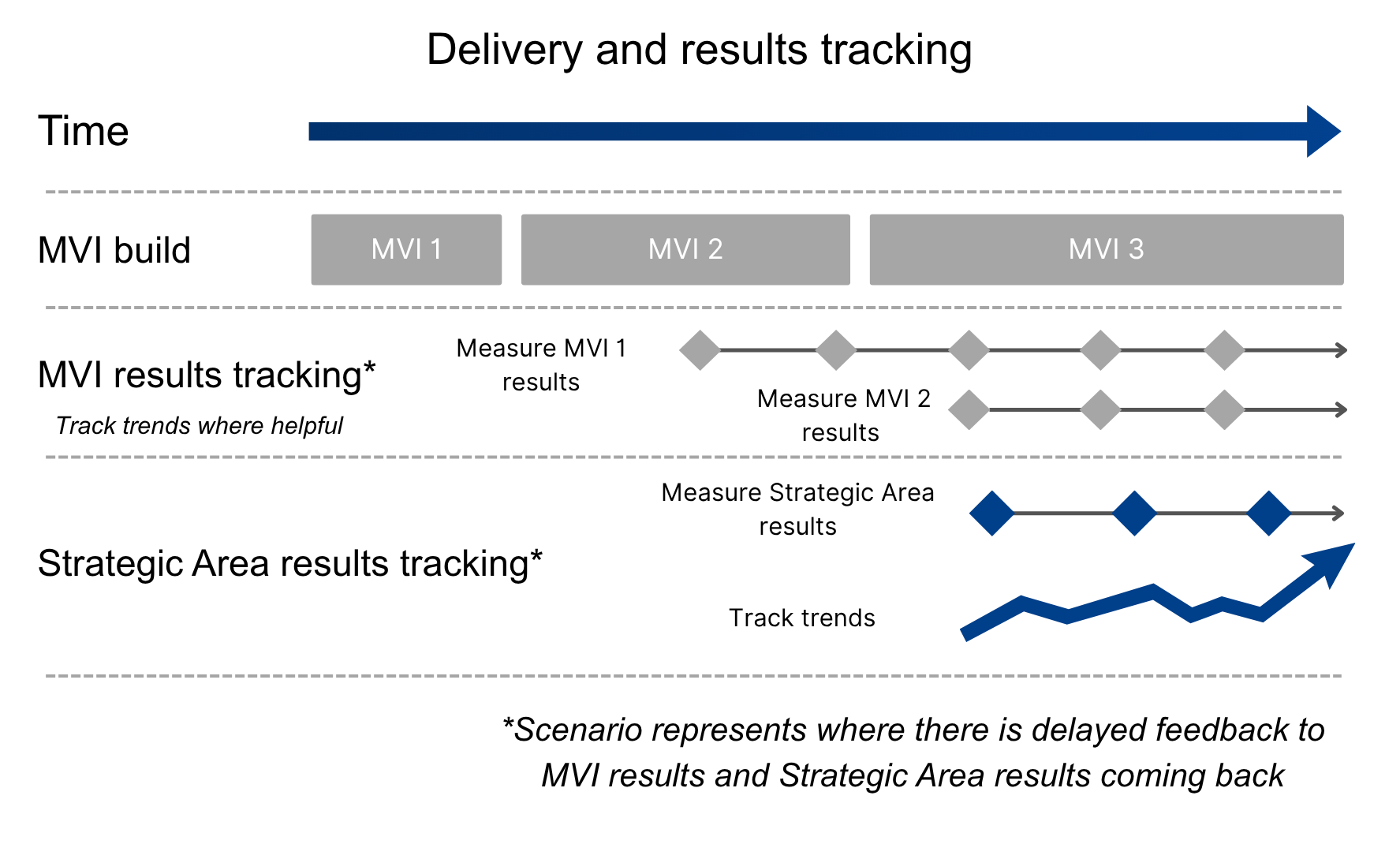
The results of the MVIs’ OKRs should be reported whenever they become available, for example, in a weekly product meeting. If the results are very poor, you may consider your overall strategy rather than waiting for a formal review meeting. Once enough MVIs have been delivered, you will be able to assess the overall OKR results in the Strategic Area.
It is very beneficial to set up automated data gathering. If data is hard to get, it can make results tracking difficult and cause people to give up. The picture below represents how MVIs are delivered and results are tracked: